
{{ js_integration_head_start() }} {{ head_elements() }} {{ head_css() }} {{ head_js() }} {{ js_integration_head() }} {{ include_default_custom_css(content.include_default_custom_css, template_meta.include_default_custom_css, domain_settings.include_default_custom_css) }} {{ include_attached_css(content_group.attached_stylesheets or domain_settings.attached_stylesheets, content.enable_domain_stylesheets, template_meta.enable_domain_stylesheets, theme_meta.enable_domain_stylesheets, domain_settings.enable_domain_stylesheets) }} {{ include_attached_css(template_meta.attached_stylesheets, content.enable_layout_stylesheets) }} {{ include_attached_css(content.attached_stylesheets) }} {{ require_attached_js(template_meta.attached_js) }} {% if not suppress_hubdb_hreflang %} {% endif %}
Skip to content
English
  • There are no suggestions because the search field is empty.

Reviewing a learner session

Every simulation carried out in your group leaves a record you can review. By opening a session, you see concretely how the exchange went, useful for supporting a learner.
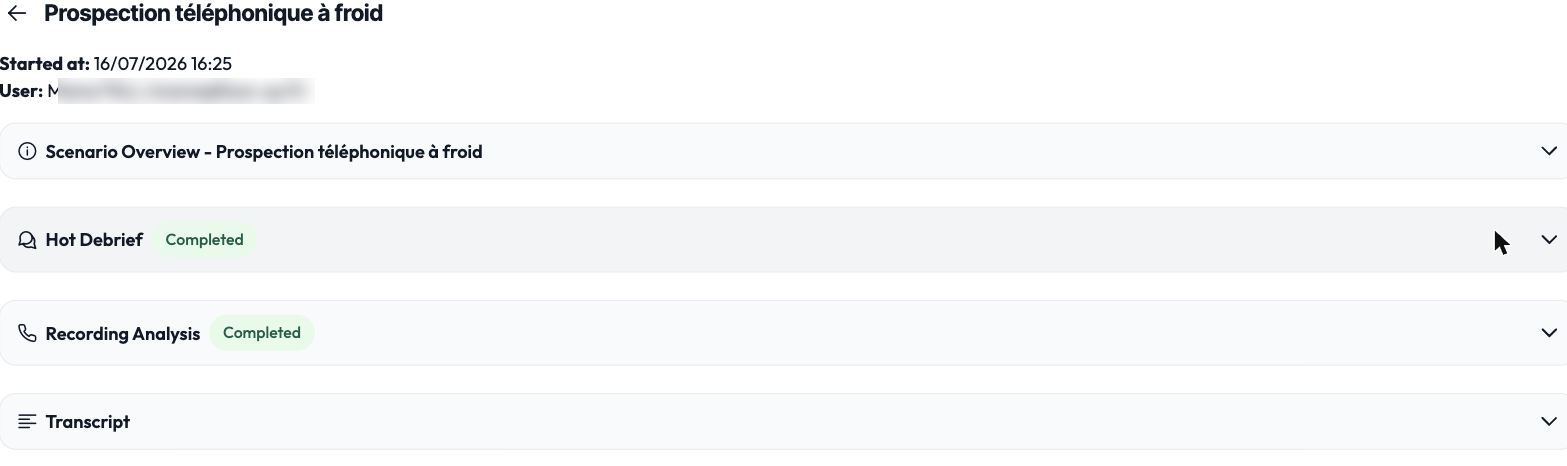
The detail of a learner session

Opening a session

From the group sessions view, click the session you're interested in. You access its full detail.

What you'll find in it

A session's detail brings together the replay of the exchange, the conversation thread between the learner and their counterpart, the self-assessment made by the learner, and the debrief. This lets you follow the person's reasoning and spot the points to work on together.

The replay and the transcript are only available if recording was enabled for the session.