
{{ js_integration_head_start() }} {{ head_elements() }} {{ head_css() }} {{ head_js() }} {{ js_integration_head() }} {{ include_default_custom_css(content.include_default_custom_css, template_meta.include_default_custom_css, domain_settings.include_default_custom_css) }} {{ include_attached_css(content_group.attached_stylesheets or domain_settings.attached_stylesheets, content.enable_domain_stylesheets, template_meta.enable_domain_stylesheets, theme_meta.enable_domain_stylesheets, domain_settings.enable_domain_stylesheets) }} {{ include_attached_css(template_meta.attached_stylesheets, content.enable_layout_stylesheets) }} {{ include_attached_css(content.attached_stylesheets) }} {{ require_attached_js(template_meta.attached_js) }} {% if not suppress_hubdb_hreflang %} {% endif %}
Skip to content
English
  • There are no suggestions because the search field is empty.

Supervise your group's sessions

The Group sessions view gives you a read on your learners' activity: all the sessions carried out in the group, in one place.
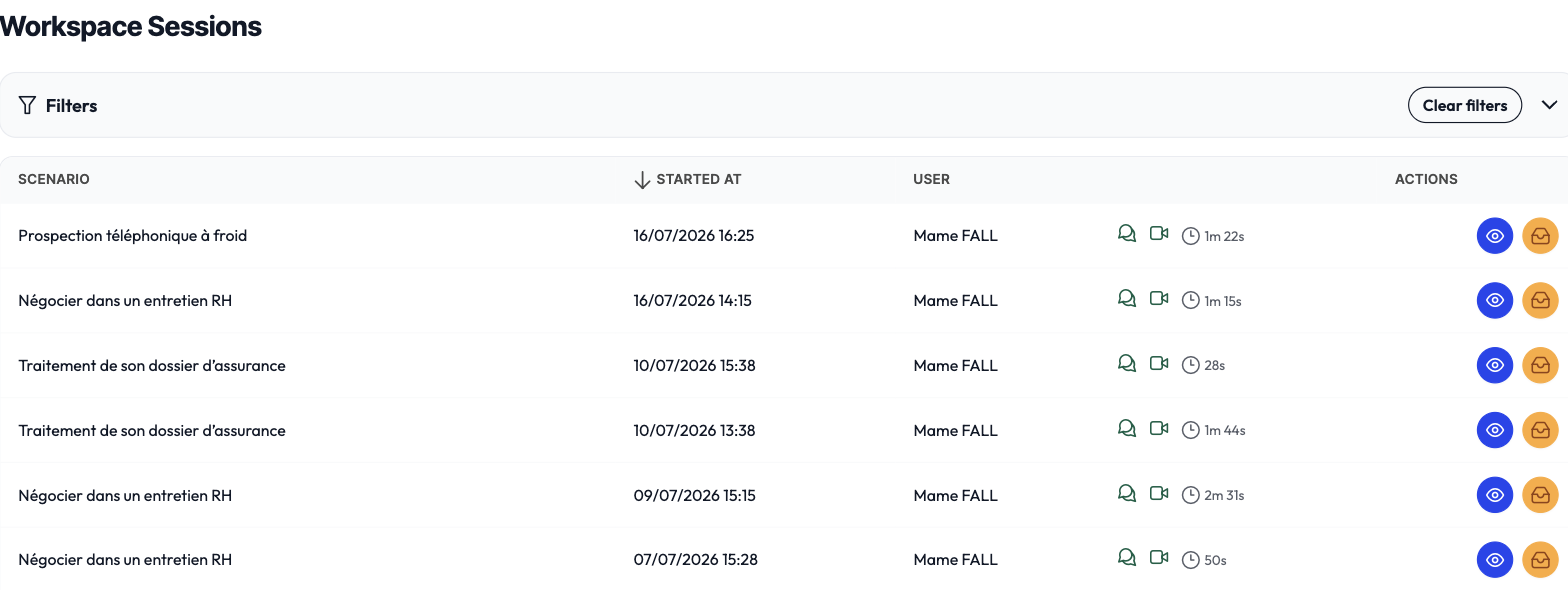
The workspace sessions list

Follow the activity

There you'll find every member's sessions, along with the scenario played. You can filter by scenario to focus on a specific piece of training. For each session, visual markers show whether the conversation actually took place, whether it was recorded, and where the debrief stands.

Open a session's detail

By opening a session, you access how it unfolded: the replay of the exchange, the conversation thread, the learner's self-assessment and their debrief. Enough to concretely support each person.

This view is reserved for trainers and admins, and concerns organization groups.